SURROUND

SphereConstellation

Move surround freely. Simply.

AAX · AU · VST3 · macOS

Free. Ships in the SphereReceiver installer, together with SphereReceiver and SphereDownMix.
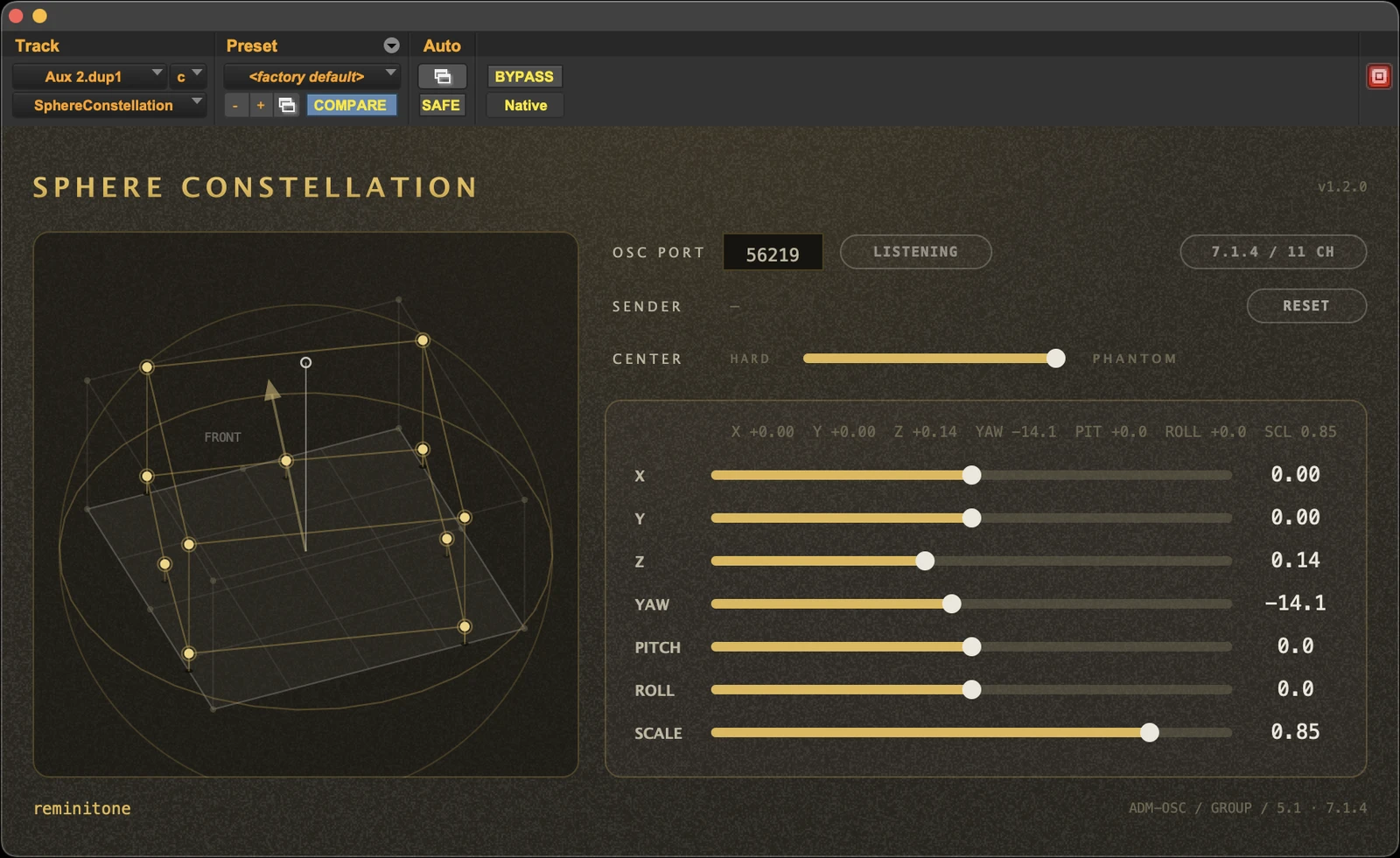
SphereConstellation plugin interface

A handy plug-in that moves the shape of surround any way you like. Free.

SphereConstellation moves an entire bed — 5.1 up to 9.1.6 — as one body. Insert it on the track, and the whole layout travels, rotates and scales together — every channel keeping its place in the formation. Position, yaw, pitch, roll and scale sit on seven automatable sliders, and yaw, pitch and roll all turn the full 360°.

Moving a whole bed — freely, and simply — is something surprisingly few tools let you do. That is the entire point of this one. Born as part of the Sphere Flow system, it turns out to pull real weight entirely on its own: take the hard centre out of a bed, rotate it, shift it off axis. Genuinely handy. And if you own a Vision Pro you can literally pinch the constellation and place it by hand. Just a plug-in, in Pro Tools or any DAW that takes AU or VST3, doing the thing post mixers keep wishing were simple.

New in v1.4

  • Beyond Pro Tools: SphereConstellation now ships as AU and VST3 too — Logic Pro, Nuendo and Studio One.
  • New bed formats: 5.1, 7.1, 7.1.2 and 9.1.6 join 7.1.4. Same seven automatable parameters, same one-body feel.

Host note: in Nuendo and Studio One, insert it in the channel's Panner slot.

Use it for

  • Moving whole beds as one — 5.1 up to 9.1.6
  • Rotating ambience, crowd and room beds
  • Reframing surround scenes in post
  • Size and width rides, written as automation

Features

  • Seven automatable parameters: X / Y / Z, yaw, pitch, roll, scale
  • Full 360° rotation on yaw, pitch and roll — around the constellation's own axes
  • MOTION (TRAIL): one switch adds a sense of physical motion behind the movement
  • CENTER control (HARD – PHANTOM): re-image the centre channel, constant-power
  • Takes mono and stereo inputs too — panned into the bed by the group transform
  • Unity passthrough at default values; LFE always passes clean
  • Connects to Sphere Flow on Vision Pro (Creative Pack)

Version history

v1.4.0
  • AU and VST3 builds join AAX.
  • New bed formats: 5.1, 7.1, 7.1.2 and 9.1.6 alongside 7.1.4.
  • Editor window can be resized (uniform zoom).
Older versions (3)
v1.3.2
  • MOTION (TRAIL): one automatable switch adds a short energy residue and a diffuse trail behind the moving sound. Off by default — bit-identical to previous versions while off. Applied inside the plug-in; not carried into ADM export / WRITE DONE.
  • Pitch and Roll now rotate around the constellation's own axes (aircraft-style). Single-axis automation plays back unchanged; lanes combining Yaw with Pitch or Roll render with the new composition.
  • New: mono- and stereo-to-bed insert — mono at Centre, stereo at L/R, panned by the group transform.
  • Automation and connection reliability overhaul; refreshed button design with status lamps.
v1.2.0
  • CENTER control (HARD – PHANTOM): re-image the centre channel from the physical C speaker to an L/R phantom centre, constant-power, automatable.
  • Group Pitch and Roll now allow a full ±180° rotation with wrap-around.
  • Clearer 3D view — front axis and zenith marker stay readable at any rotation.
  • Compatibility: automation written with earlier versions plays back mirrored (Group X) or at twice the angle (Pitch / Roll) — re-write those lanes after updating.
v1.1.2
  • First release, inside the SphereReceiver installer.
Format
AAX / AU / VST3
Host
Pro Tools · Logic Pro · Nuendo 13 · Studio One 7
OS
macOS 12 (Monterey) or later
Layouts
5.1 · 7.1 · 7.1.2 · 7.1.4 · 9.1.6
Price
Free

Free. Ships in the SphereReceiver installer, together with SphereReceiver and SphereDownMix.

Pro Tools is a trademark of Avid Technology, Inc. Apple Vision Pro and visionOS are trademarks of Apple Inc. SphereConstellation is an independent product and is not affiliated with, authorised or endorsed by these companies.